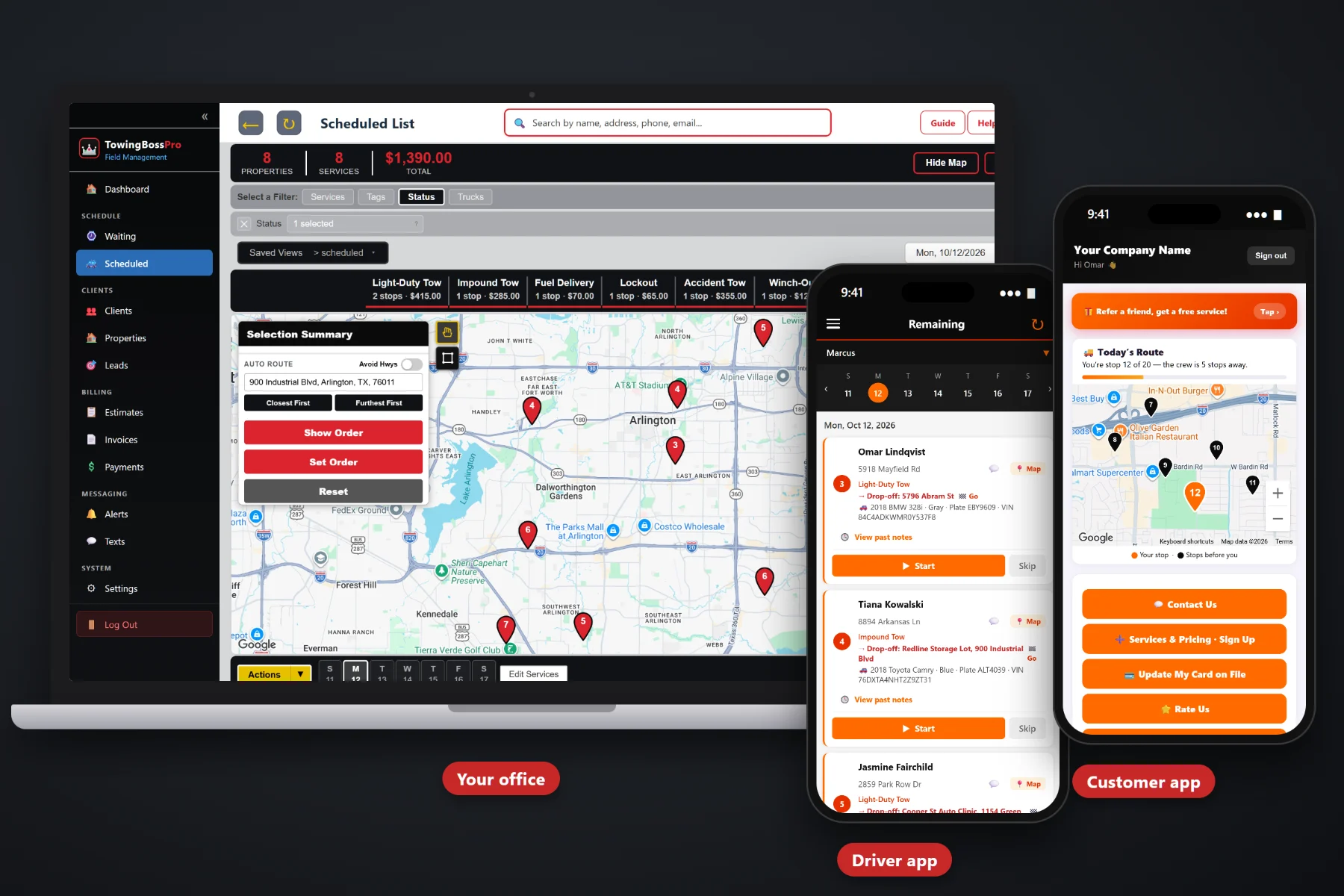
A roadside call is won in the first few minutes: get the location and the vehicle right, send the right driver, and tell a stranded, nervous customer exactly when help is coming. TowingBossPro puts every jump start, lockout, tire change, fuel delivery and winch-out on a live waiting list map, assigns it to a driver and truck in one step, texts the customer a live map of the driver on the way, and gets the invoice paid before your driver pulls back into traffic.
Jump starts, lockouts, tire changes, fuel deliveries and winch-outs all start the same way: a stranded driver, a location and a vehicle. TowingBossPro keeps the call, the vehicle, the driver, the customer texts and the invoice in one place, at a flat monthly price that is never billed per user. New here? Start with Roadside Assistance Software: The Complete Guide for Towing Companies Running Service Calls.
Every incoming roadside call sits on a live map, so the dispatcher sees where the stranded drivers are before choosing who goes.
Circle calls on the map or select them, then assign them to a driver and truck in one step. The call lands in the driver app in route order.
Year, make, model, color, plate and VIN on the call, so the driver spots the right car on a dark shoulder and brings the right tools.
The customer app shows the driver on the way on a live map, and one-tap on-the-way and arrival texts tell them when help is close.
Invoice the call, take payment online from the customer's phone, or charge the card on file. Payment follow-ups chase the rest.
Customers, repeat locations, commercial accounts and recurring package plans turn one-time roadside calls into regular business.
Most wasted roadside trips start at intake: the wrong exit, the wrong car, a flat with no usable spare, a lockout with the keys in the trunk. TowingBossPro puts everything the driver needs on the call itself, so the person on the phone captures it once and the driver sees it on the way.
Nobody has time for a long rollout when the phone is ringing. TowingBossPro follows the way a roadside call actually runs: intake, assign, update the customer, finish and get paid.
Location, vehicle and what is wrong go on the call, and it drops onto the waiting list map with every other open call.
Look at the map, pick the driver and truck that make sense, and assign the call in one step. It shows in the driver app in route order.
One-tap on-the-way and arrival texts and a live map of the driver on the way, so the stranded customer stops calling back.
The driver completes the call with photos, the invoice goes out, and the customer pays online or the card on file is charged.
Roadside work is high volume and low ticket. Every wasted mile, repeat phone call and unpaid invoice eats the margin.
The call comes in while dispatch is on another line. Somebody scribbles “dead battery, the big store on the highway, gray Honda” and texts it to whichever driver answers first. The driver ends up at the wrong store, the customer calls back three times asking where the truck is, and when the jump is done nobody remembers to send the bill.
Generic job software does not know that a roadside call needs an exact location, a vehicle description and a customer update within minutes, or that a failed jump start is about to become a tow with a drop-off address.
TowingBossPro is built for towing companies, with categories for Light-Duty Tows, Heavy-Duty Tows, Roadside, Accident & Recovery, Impound & Storage and Transports, and a call record built around the vehicle and the two addresses that matter.
Everything a towing company needs to run roadside calls from the first ring to the paid invoice.
Incoming calls wait on a live map. Circle a group of calls or select them and assign them to a driver and truck in one step.
See every truck by day with its route order, and let auto-routing order the stops when roadside calls are mixed in with tows.
Year, make, model, color, plate and VIN on every call, so drivers find the right car and the invoice names the right vehicle.
Calls in order, pickup and drop-off, vehicle details, notes, start and complete, vehicle photos and one-tap on-the-way and arrival texts.
Customers watch the driver on the way on a live map, see invoices, pay online, keep a card on file and choose their alerts.
Automated texts and emails keep the customer posted, and two-way texting gets you a better location or a photo of the problem.
Every call has a pickup and a drop-off address. When the jump fails, add the drop-off, change the category and send an estimate for approval.
Quote the tow or the extra work and let the customer approve it online from their phone while your driver is still on scene.
Invoice the call with sales tax, take payment online, charge a card on file, auto-bill and send payment follow-ups on anything unpaid.
Fleets, dealerships and property managers get their calls and invoices grouped under one account.
Sell roadside memberships and service packages as recurring plans, so repeat customers come back to you first.
Light-Duty Tows, Heavy-Duty Tows, Roadside, Accident & Recovery, Impound & Storage and Transports keep the board and reports clear.
See calls and revenue by category to learn whether roadside work is paying its way.
Add dispatchers and drivers without per-seat charges. Plans are priced per company, not per person.
Roadside calls pile up in bursts: the first cold morning, a holiday weekend, a rainstorm at rush hour. The waiting list map shows every open call where it actually is, and the dispatch board shows where each truck is headed today. The dispatcher picks the driver who makes sense, assigns the call to the driver and truck in one step, and the call shows up in the driver app with the vehicle and notes attached. For the full walkthrough, read Roadside Assistance Software: The Complete Guide for Towing Companies Running Service Calls.
The driver taps on-the-way and the customer gets a text, then watches the truck come to them on a live map in the customer app. On scene, the driver works the call, snaps vehicle photos and taps complete. The invoice goes out with sales tax, and the customer pays online from their phone or the card on file is charged. If the battery is shot and the car needs a tow, the same call gets a drop-off address and an estimate the customer approves online.
Pick the plan that fits your company today and move up as you grow. Adding a dispatcher or a driver never adds a per-seat charge.
14-day free trial · No credit card required · Never billed per user. Compare plans.
Yes. Roadside is its own category, covering jump starts, lockouts, tire changes, fuel delivery and winch-outs, alongside Light-Duty Tows, Heavy-Duty Tows, Accident & Recovery, Impound & Storage and Transports.
Incoming calls sit on the waiting list map and the dispatch board shows each truck by day with its route order. The dispatcher looks at both, picks the driver and truck that make sense, and assigns the call in one step by circling or selecting it.
Yes. The driver sends one-tap on-the-way and arrival texts from the driver app, and the customer app shows a live map of the driver on the way.
Every call has a pickup and a drop-off address. Add the drop-off, move the call to the right tow category, and send an estimate the customer can approve online while the driver is still on scene.
Invoice the call with sales tax and the customer can pay online from their phone or through the customer app, or you can charge a card on file. Automatic payment follow-ups go out on invoices that stay unpaid.
Start is $59/month, Pro is $89/month, and Crew is $199/month. Plans are never billed per user, and every plan starts with a 14-day free trial with no credit card required.
TowingBossPro runs your whole towing operation — roadside calls, tows, recoveries, impound, drivers and billing — from one platform. See the full platform overview.
Put every jump start, lockout, tire change, fuel delivery and winch-out on a live map, keep stranded customers informed, and get paid on scene. Try TowingBossPro free for 14 days.