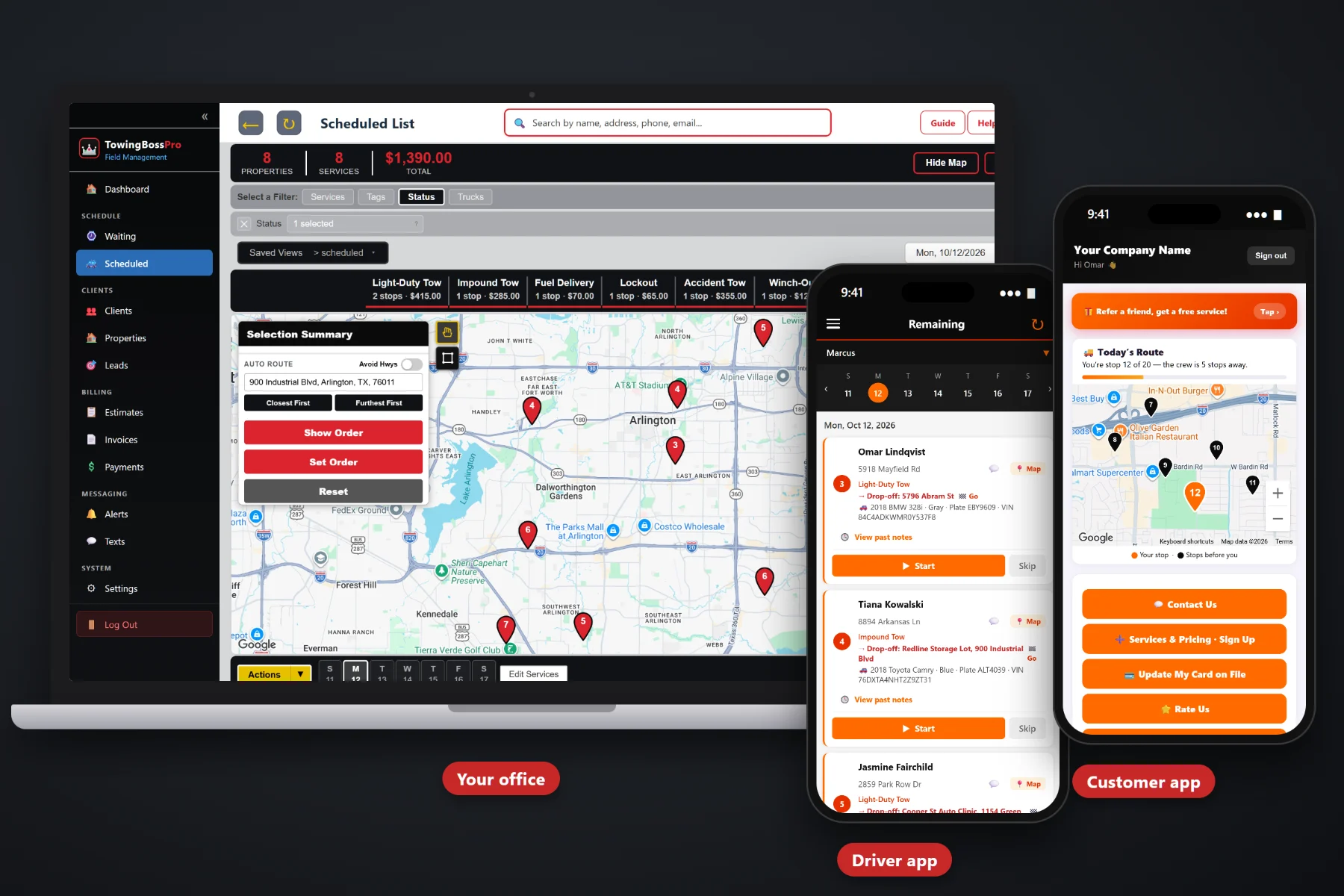
Hooking the car is the easy part. The ticket that sits on the dash for three days, the winch time nobody wrote down, the storage days counted on a wall calendar and the account that pays "when they get to it" — that's where a tow company's money leaks out. TowingBossPro builds invoices straight from completed calls, keeps cards on file, takes online payments, adds storage days automatically and follows up on anything unpaid.
Generic invoicing apps were made for businesses that sell the same thing at the same price. No two tows bill alike: the pickup, the drop-off, the vehicle, the recovery and the days in the yard all change the total. TowingBossPro is built around that: every call carries the addresses, the vehicle and the driver's notes, and the invoice comes from the call.
When the driver taps complete in the mobile app, the office invoices from the same record — customer, pickup, drop-off and vehicle already attached. No retyping a paper ticket.
Keep a card on file and the invoice is charged when the call is complete. Made for dealers, body shops, fleets and regulars who call you again and again.
Customers watch the driver on a live map, then see their invoice and pay online from their phone. No envelope, no reading a card number over the phone.
Impound and storage calls carry a storage start date and daily rate, and the storage days are added to the invoice. No release-window math.
Motor clubs, police and municipal agencies, body shops, dealers and property managers, with every call and invoice kept under the account.
Automated payment reminders by text and email, each with a link the customer can pay from. Dispatch stops spending Fridays chasing money.
The driver works the call in the mobile app with notes and vehicle photos, then taps complete. The office sees it as done, adds the winch time from the driver's notes and sends it — or the card on file is charged automatically. The call and the money are one connected record instead of a paper ticket and a spreadsheet. For the full walkthrough, read Towing Invoicing Software: The Complete Guide for Tow Operators Who Want to Get Paid Faster.
Most billing software is built for accountants. TowingBossPro is built for the dispatcher who is answering the phone, watching the map and invoicing calls at the same time. Import your customers, set up your categories and start invoicing completed calls.
Light-Duty Tows, Heavy-Duty Tows, Roadside, Accident & Recovery, Impound & Storage and Transports. Every call lands in the right category, so invoices and reports line up with the work you actually do.
Drivers tap complete in the mobile app with notes and vehicle photos. They never argue price at the curb — the closeout is what the office invoices from.
Estimates, invoices, payments, storage and reports live next to your Waiting List and dispatch board. No jumping between a notepad, a spreadsheet and a separate card terminal.
Payment reminders and estimate follow-ups go out automatically by text and email. Nobody in the office has to call about last month’s tow.
A tow invoice is never just "one service, one price." The caller said it was a simple tow. The car was in the ditch. The drop-off changed halfway there. The owner didn't show up for nine days.
On paper, every one of those details has to survive the trip from the scene to the dash to the office. Some don't. The winch time never gets billed, the extra miles to the second shop are forgotten, the storage days are counted wrong at release and the roadside call from two weeks ago is still sitting in someone's text messages.
TowingBossPro keeps it all on one record. The call holds the pickup and drop-off addresses and the vehicle's year, make, model, color, plate and VIN. The driver adds what actually happened, with photos. The invoice is built from both, with every charge on its own line.
Billing is one part of the platform. To see how it connects with the Waiting List, the dispatch board, the driver app and the customer app, take a look at the full TowingBossPro overview.
Every billing tool in TowingBossPro connects to the customer or account, the vehicle and the call — so what the driver did is what the customer is billed for.
Invoice a call as soon as the driver completes it. Customer, pickup, drop-off and vehicle are already attached, so nothing gets retyped and nothing gets missed.
Hook, mileage, winch time, roadside services, equipment and extras each on their own line, with sales tax applied where it belongs.
Keep a customer's card on file and auto-bill invoices when calls are completed. Ideal for dealers, body shops, fleets and repeat customers.
Customers watch the driver on a live map, see their invoices and pay online from their phone. They can keep a card on file and choose their alerts.
Storage start date and daily rate on every impound and storage call, with storage days added to the invoice when the vehicle is released.
Take payment up front on scheduled tows and long-distance transports, then apply it to the final invoice so the customer only sees the balance due.
Send itemized estimates for transports and planned recoveries that customers approve online, with automatic follow-up on the ones that sit.
Automated payment reminders by text and email keep invoices from sliding into 60-day territory, with a pay-online link in every message.
Motor clubs, police and municipal agencies, body shops, dealers and property managers, each with its calls and invoices kept under the account.
Year, make, model, color, plate and VIN on the call and the invoice, so accounts can match every charge to the right vehicle.
Drivers see calls in order with pickup, drop-off and vehicle details, add notes and vehicle photos, and tap complete. The closeout is the billing document.
Incoming calls on a live map, then a dispatch board by truck and day with route order and auto-routing. Every call that runs is a call that gets billed.
On-the-way and arrival texts, automated emails and two-way texting, so a quick invoice question gets answered without a phone call.
See what you invoiced, what you collected and what is still outstanding, by category, and spot slow accounts before they reach collections.
Bring your customer list in from a spreadsheet and start invoicing real calls during your free trial.
Every driver, dispatcher and office person can have a login. Plans are a flat monthly price, never billed per user.
Transports and planned recoveries tie up a truck for hours. TowingBossPro sends an itemized estimate the customer approves online, follows up automatically when it sits, takes a prepayment to lock in the date and applies it to the final invoice once the call is complete. The customer sees the full job, the prepayment received and the balance due — nothing to argue about.
Cash flow is what squeezes tow companies — fuel, truck payments, insurance, repairs and payroll don't wait for checks in the mail. TowingBossPro collects several ways: cards on file charged when the call is done, online invoices customers pay from their phone or the customer app, prepayments on transports and automated follow-ups for everything else. Commercial accounts get invoices that name the exact vehicle.
Add every driver, dispatcher and office person without your bill going up. Try it free for 14 days — no credit card required. See the full plan comparison.
No contracts. Cancel anytime. 14-day free trial, no credit card required.
Yes. When the driver completes a call in the driver mobile app, the office invoices it from the same record, with the customer, pickup and drop-off addresses and vehicle details already attached, plus the driver’s notes and photos.
As line items. The hook or service charge, loaded miles, winch or recovery time, equipment and extras each go on their own line, and the driver’s notes tell the office what to add. Sales tax can be applied to the lines that need it. Rates vary and may be regulated where you work, so set your price structure with your local rules in mind.
Impound and storage calls carry a storage start date and a daily rate, and the storage days are added to the invoice, so the total is ready when the owner comes for the vehicle.
Yes. Customers can keep a card on file, and invoices can be auto-billed when the call is completed. Customers without a card on file can pay their invoice online or from the customer app, which also shows a live map of the driver on the way.
Yes. Commercial accounts such as motor clubs, police and municipal agencies, body shops, dealers and property managers keep their calls and invoices under the account. TowingBossPro does not connect to motor club or police rotation systems; it is your own record of every call and what you are owed.
Yes. Send an estimate the customer approves online, take a prepayment, and apply it to the final invoice so the customer only sees the balance due.
Plans are Start at $59/month, Pro at $89/month and Crew at $199/month. You are never billed per user, and the 14-day free trial requires no credit card.
Billing is one piece — TowingBossPro also runs your Waiting List, dispatch board, driver app, customer app, commercial accounts, impound and storage and automated customer texts and emails from the same platform. See the full TowingBossPro overview.
Practical articles on invoicing tows, mileage, winch time, roadside calls, storage days, card on file, commercial accounts and collections — start with Towing Invoicing Software: The Complete Guide for Tow Operators Who Want to Get Paid Faster.
TowingBossPro turns completed calls into invoices, keeps cards on file, adds storage days for you and follows up on unpaid bills. Try it free for 14 days.