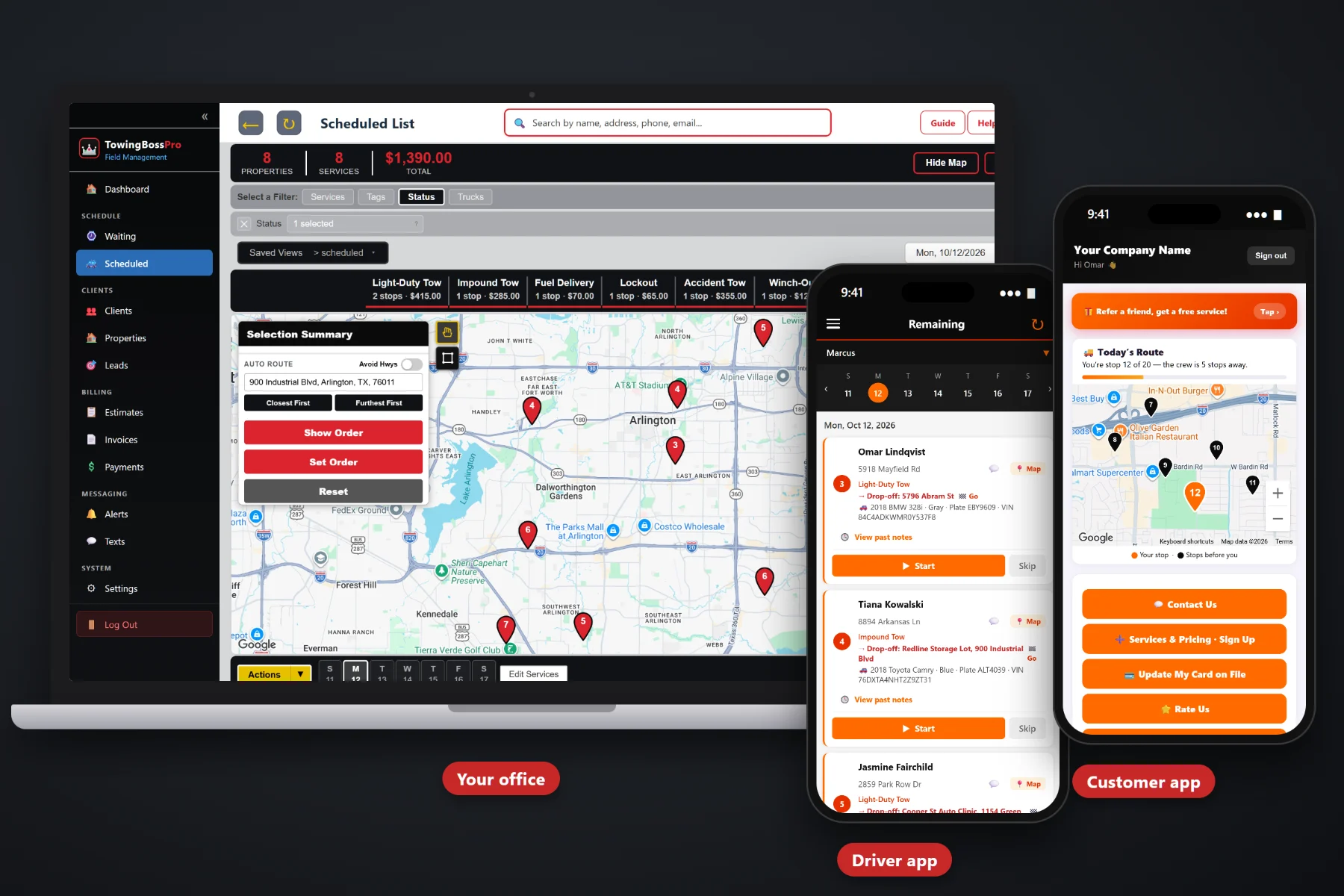
Towing does not run on a calendar. Calls land three at a time, every one has a pickup and a drop-off, half of them need a specific truck, and every customer on a shoulder wants to know when you're coming. TowingBossPro is dispatch software built around the Waiting List of incoming calls on a live map, one-step driver and truck assignment, a dispatch board by truck and automatic texts that answer "where's my truck?" before the phone rings.
Plans start at $59/month, and what you get is built for the way towing companies really dispatch — a Waiting List of open calls on a live map, one step to send calls to a driver and truck, a dispatch board for every truck in route order, and a driver app with the pickup, drop-off and vehicle details already loaded. Never billed per user.
Every incoming call lands as a pin at its pickup location. See clusters and outliers at a glance, then circle calls on the map or select them from the list.
Assign one call or a whole group to a driver and a truck at the same time. The call moves to that truck's board and shows up in the driver's app.
Each truck's calls by day, in route order, with auto-routing for planned work. See who is loaded, who is free and who is about to clear.
Two addresses on every tow, both on the map and in the driver app with one-tap navigation. Nobody calls the office asking where the car goes.
One-tap on-the-way and arrival texts from the driver app, a live map of the driver in the customer app and two-way texting for everything else.
Calls in order, vehicle details, notes, access notes, start and complete, and vehicle photos that attach to the call.
The dispatch board is where the plan meets the real day. Each call carries its category, so a heavy-duty recovery never gets mistaken for a quick lockout. When rush hour hits, a storm fills the Waiting List or a police call needs to jump the line, the dispatcher has every truck's day in front of them and can move the right call to the right truck.
Dispatch software only works if the office and the drivers actually use it. TowingBossPro keeps each screen focused on the call in front of you, so a new dispatcher or a driver who hates phones can be productive on day one.
Import customers and locations by CSV, then set up your commercial accounts: motor clubs, police and municipal, body shops, dealers and property managers. Add your trucks and drivers. Records get better every time a call adds a note or a photo.
Every call goes in with a pickup, a drop-off, the vehicle details and a category. It lands as a pin on the live map, so for the first time you can see all your open calls in one place instead of on a notepad.
Circle calls on the map or select them from the list and send them to a driver and truck in one step. They land on that truck's dispatch board in route order and in the driver's app with one-tap navigation.
Turn on on-the-way and arrival texts, let customers watch the driver on a live map, and connect invoicing and card on file. From there the follow-up work happens on its own while your trucks keep moving.
A tow call is not just an appointment. It is a pickup and a drop-off, a vehicle the driver has to pick out of a crowded lot, a truck that has to match the job, and a customer on the side of the road who needs to know someone is coming.
A notepad does not know that a loaded box truck in a ditch needs the heavy wrecker while a dead battery in a parking lot needs ten minutes and a jump pack. It does not tell the driver where the car is going, show you which truck is about to clear on the east side, or text the customer when the truck is on the way.
So dispatch ends up living in one person's head, a whiteboard and a string of texts to drivers. That works until rush hour drops six calls in ten minutes, an ice storm fills the phones for two days, or the one dispatcher who knows where every truck is goes home. TowingBossPro puts all of it in one system the whole office and every driver can see.
To see how the pieces fit together — the Waiting List, assignment, the dispatch board, route order, storms and customer texts — start with Tow Dispatch Software: The Complete Guide for Towing Companies.
Every tool here is aimed at the way towing companies take calls, send trucks and get paid — from the first ring to the payment.
Every unassigned call on a map at its pickup location. Circle calls or select them and hand them out together.
Send calls to a driver and a truck at the same time, so the board always shows which equipment is out on which call.
Each truck's calls by day in route order on the Scheduled list. Reorder when a priority call has to jump the line.
Chain drop-offs to nearby pickups and let auto-routing order planned transports, dealer runs and scheduled pickups.
Two addresses on every call, both on the map and in the driver app with one-tap navigation.
Year, make, model, color, plate and VIN on every call, so the driver hooks the right vehicle and the office picks the right truck.
Light-Duty Tows, Heavy-Duty Tows, Roadside, Accident & Recovery, Impound & Storage and Transports, each its own category.
One-tap on-the-way and arrival texts, a live map of the driver in the customer app, and two-way texting with every reply on the customer record.
Calls in order, pickup and drop-off, vehicle details, notes, access notes, start and complete, and vehicle photos.
Motor clubs, police and municipal, body shops, dealers and property managers, with calls and invoices kept under the account.
Storage start date and daily rate on the call, with the storage days added to the invoice.
Quote long transports and bigger jobs with estimates customers approve online before the truck is booked.
Invoice from the completed call, charge a card on file, take online payments, apply sales tax and send payment follow-ups.
Review calls by category, truck load, open calls and unpaid invoices each week to see where dispatch is getting stuck.
Add drivers, dispatchers and office staff without per-seat charges. Time clock included. The Crew plan includes unlimited users.
Customers stuck on the side of the road call back because they don't know whether anyone is coming. Automatic texts give them that answer first. The driver taps once for an on-the-way text and once for an arrival text, and the customer can watch a live map of the driver on the way. Two-way texting covers the rest: better locations, drop-off addresses, honest updates when a call runs late. For the full picture of how texting fits into dispatch, read Tow Dispatch Software: The Complete Guide for Towing Companies.
Assign a call and it lands in the driver's app with everything attached. They see the calls in order, the pickup and drop-off with one-tap navigation, the year, make, model, color, plate and VIN, plus notes and access notes. They tap on-the-way so the customer knows, hook the right vehicle, take photos and mark it complete. The office sees the board update without a phone call.
Pick the plan that fits your company today. Every plan starts with a 14-day free trial, no credit card required.
14-day free trial. No credit card required. Never billed per user.
Practical guides on the Waiting List, assignment, the dispatch board, route order, rush hours, storms, heavy-duty calls, after-hours work and customer texts — written for towing companies.
Yes. TowingBossPro is dispatch software built around tow calls: a Waiting List of incoming calls on a live map, one-step driver and truck assignment, a dispatch board by truck and day, pickup and drop-off addresses with vehicle details on every call, and categories for Light-Duty Tows, Heavy-Duty Tows, Roadside, Accident & Recovery, Impound & Storage and Transports.
Circle calls on the Waiting List map or select them from the list, then choose a driver and a truck. The calls move to that truck's dispatch board in route order and show up in the driver's app with the pickup, drop-off, vehicle details and notes.
The driver taps on-the-way in the driver app and the customer gets a text, then taps arrival when they pull up. In the customer app, the customer can watch a live map of the driver on the way. Two-way texting handles everything else.
No. Calls from motor clubs, police and municipal agencies are entered by your dispatcher, then kept under that commercial account with their invoices so billing stays together.
Yes. Add your trucks and employees, assign every call to a driver and truck, and use the time clock for shifts. TowingBossPro is never billed per user, and the Crew plan includes unlimited users.
Start is $59/mo, Pro is $89/mo and Crew is $199/mo with unlimited users. Every plan starts with a 14-day free trial, no credit card required.
TowingBossPro dispatches, routes, texts and bills your entire towing company from one platform — see the full platform overview.
Put your Waiting List, dispatch board, driver app and customer texts in one place. Try TowingBossPro free for 14 days.